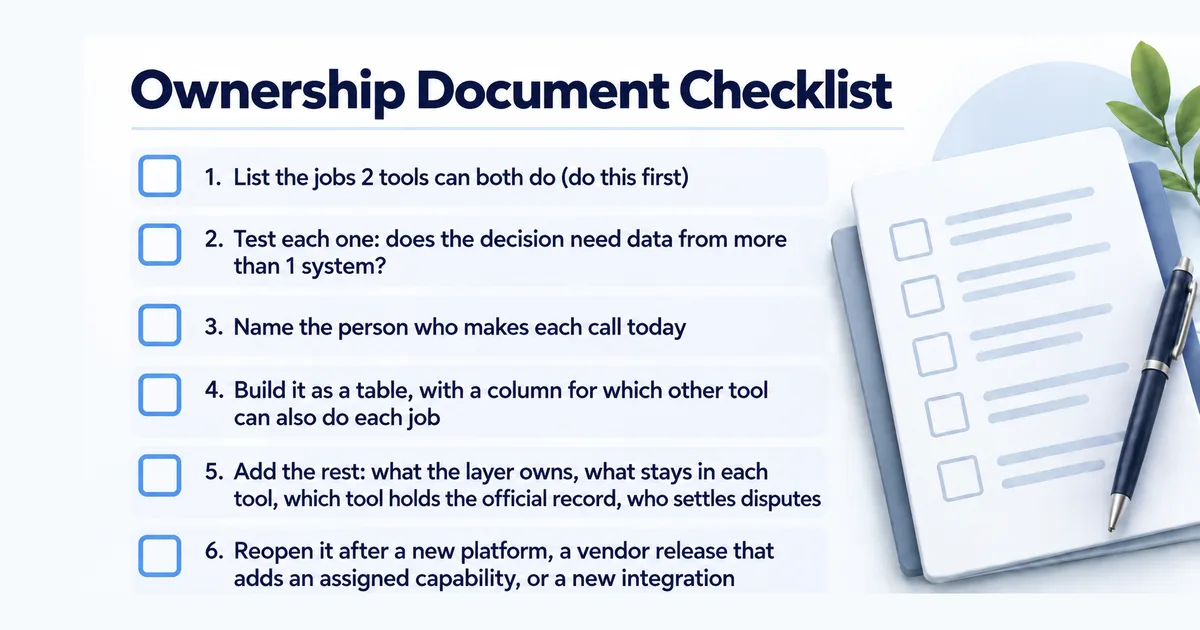
Write one page that says which tool makes which decision: the orchestration layer owns the decisions that need data from more than 1 tool (journeys, routing, which tool wins a conflict), and each tool keeps the work it already does on its own data. The real work is settling the jobs 2 tools can both do, naming who makes each call today, and reopening the page after vendor releases.
Key Takeaways
- A one-page ownership document is easy to start. Settling the jobs 2 tools both claim, and keeping them settled, is the work.
- Start with the jobs 2 tools can both do, like lead scoring and suppression. That overlap is where ownership documents fail.
- If a shared job needs data from more than 1 system, the orchestration layer owns it. Otherwise the tool keeps it.
- Reality check: name the person who makes each call today as its owner, or the team will ignore the document.
Start with the jobs 2 tools can both do
Say you’ve added software that decides which of your tools acts on a customer, and when (an orchestration layer). The first draft of a document that says what it owns is easy to write. The layer owns the decisions that need data from more than 1 tool: journeys, routing, and which tool wins when 2 disagree. Each tool keeps doing what you bought it for. The CRM owns account data, the marketing automation platform owns email execution, the CDP owns identity. Write that down and most of the boundary is settled. (If you’re still deciding whether the layer is worth adding, that’s a separate question worth settling first .)
The hard part is the jobs 2 tools can both do.
Lead scoring is the classic one. Your marketing automation platform has a scoring model, built on actions like email opens and website visits (1. HubSpot, 2024). Your orchestration layer can score too, and on more data. Twilio Segment, the customer data platform with a built-in journey tool, predicts each customer’s likelihood to purchase from all the events sent to it, including ones your email platform never sees (2. Twilio Segment, n.d.). So who owns the score? Suppression is another. HubSpot, by default, skips contacts who haven’t opened or clicked any of their last 11 to 16 marketing emails (3. HubSpot, 2020). Adobe Journey Optimizer can cap messages across email, SMS, and push as one total (4. Adobe, 2026). Run both, and the platform can still email a customer the layer has stopped messaging. Send-time, deduplication, consent, picking the next offer or message for each customer (next-best-action): each of them can often run in more than 1 place.
List those overlaps first. They’re the reason the document exists, and a one-page ownership document is useful only when it settles them.
One test for deciding who owns a shared job
For each overlap, ask one question: does the decision need context from more than 1 system to be correct?
If it does, the orchestration layer owns it. Cross-channel fatigue suppression has to see email, SMS, and push at once, so no single tool can make that call correctly. The layer owns the decision, and each tool executes what the layer decides.
If the decision is correct using only what one tool already knows, that tool keeps it. Hard bounces and email unsubscribes: the marketing automation platform has everything it needs, and routing them through the orchestration layer adds an extra step and another place for it to break.
The test cuts most overlaps cleanly. The few it doesn’t cut are the ones worth a real conversation, and now you know exactly which jobs those are instead of arguing about all of them at once.
Name the person who makes each call today
I think people break these documents before systems do. Someone has to be allowed to change the orchestration rules. Someone has to approve that change. Someone in each tool has to accept that a decision they used to make now comes from the layer.
Write the decision rights to match who makes the call today, not who the org chart says should. If the email manager has owned suppression logic for 3 years, a document that hands it to a central orchestration team without a conversation is a document that gets ignored. Name the real owner, name who signs off on changes, and name who gets consulted when a change spans tools. Your org chart decides how the stack runs , so the boundary has to match it or route around it on purpose.
What the document needs at minimum
Build it as a table with a row for each job, and give it a column for which other tool can also do that job. That column records the overlaps you settled with the test above, so no one hands a job back to a second tool by accident after the next vendor release.
The rest fits on 1 page:
- List the decisions the layer owns, one row per job.
- Name what stays in each tool, including its own data, the work it executes, and settings that only matter inside it.
- Name which tool is the authority for customers, segments, campaigns, and consent (the system of record), so 2 tools never claim the same record.
- Record who changes rules, who approves changes, and who is consulted (decision rights ).
- Say who settles it when a request spans tools, or when a layer rule conflicts with how a tool works on its own.
Keep the document current when your tools change
An ownership document is accurate the day you write it and can be wrong after the next tool update. Say your CDP includes journey orchestration , as Twilio Segment’s Engage product does at no separate purchase (5. Twilio, 2026), or your marketing automation platform adds a feature that picks the next message for each customer. A job you gave the layer can now also run in a tool, and the overlap you resolved is back.
Tie the review to change, not to the calendar. A quarterly review can land months after the release that changed who owns what. Ownership shifts when the tools change: a new platform, a major vendor release that adds a job you already assigned, an integration that changes who holds which data.
Start the document with your overlap list, and reopen it the day a vendor release adds a job you’ve already assigned.
Frequently Asked Questions
How do you document what an orchestration layer owns versus the existing tools?
What belongs in the orchestration layer versus the individual tools?
Why do martech ownership documents fail?
References
- HubSpot. (2024). Overview of the lead scoring tool. HubSpot Knowledge Base. https://knowledge.hubspot.com/scoring/understand-the-lead-scoring-tool
- Twilio Segment. (n.d.). Predictions. Segment Documentation. https://segment.com/docs/unify/traits/predictions/
- HubSpot. (2020). Understand graymail and avoid sending email to unengaged contacts. HubSpot Knowledge Base. https://knowledge.hubspot.com/marketing-email/what-is-graymail-and-how-can-i-avoid-sending-my-email-to-unengaged-contacts
- Adobe. (2026). Frequency capping by channel and communication type. Adobe Journey Optimizer Documentation. https://experienceleague.adobe.com/en/docs/journey-optimizer/using/conflict-prioritization/capping-rules/channel-capping
- Twilio. (2026). Journeys. Twilio. https://www.twilio.com/en-us/products/engage/journeys